hammerspoon은macOS에서만 돌아가는 자동화 툴이다.Lua를 내장하고 있다. 마음에 든다.
What is Hammerspoon?
This is a tool for powerful automation of OS X. At its core, Hammerspoon is just a bridge between the operating system and a Lua scripting engine.
What gives Hammerspoon its power is a set of extensions that expose specific pieces of system functionality, to the user. With these, you can write Lua scripts to control many aspects of your OS X environment.
How do I install it?
Manually
- Download the latest release
- Drag
Hammerspoon.appfrom yourDownloadsfolder toApplications
Homebrew
brew install hammerspoon --cask
사용법
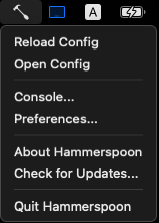
- ~/.hammerspoon/init.lua 코딩한다. 아래 메뉴에
Open Config를 선택해도 된다. - 아래 메뉴에
Reload Config를 선택해 Reload 한다. - Console 창을 보고 싶으면 아래 메뉴에
Console...을 선택한다.
What next?
Out of the box, Hammerspoon does nothing - you will need to create ~/.hammerspoon/init.lua and fill it with useful code. There are several resources which can help you:
- Getting Started Guide
- API docs
- FAQ
- Sample Configurations supplied by various users
- Contribution Guide for developers looking to get involved
- An IRC channel for general chat/support/development (#hammerspoon on Libera)
- Google Group for support
나의 Hammerspoon
init.lua:
do -- Reload Hammerspoon
  hs.hotkey.bind({'ctrl', 'option', 'cmd'}, 'r', hs.reload)
end

do -- Launch or Focus Terminal
  hs.hotkey.bind({'cmd'}, 'return', function()
    hs.application.launchOrFocus('Alacritty')
  end)
end

do -- Window Hints
  hs.hints.hintChars = {'A', 'S', 'D', 'F', 'Q', 'W', 'E', 'R'}
  hs.hotkey.bind({'shift'}, 'tab', hs.hints.windowHints)
end

do -- 윈도우창 크기 조절
  local function moveToLeft()
  local win = hs.window.focusedWindow()
  local frame = win:frame()
  local screen = win:screen():frame()
  if frame.x == screen.x and frame.w == math.floor(screen.w / 2) then
    frame.w = screen.w / 3
  elseif frame.x == screen.x and frame.w == math.floor(screen.w / 3) then
    frame.w = screen.w / 1.5
  else
    frame.w = screen.w / 2
  end
  frame.x = screen.x
  frame.y = screen.y
  frame.h = screen.h
  win:setFrame(frame)
  end

  local function moveToRight()
  local win = hs.window.focusedWindow()
  local frame = win:frame()
  local screen = win:screen():frame()
  if frame.x ~= screen.x and frame.w == math.floor(screen.w / 2) then
    frame.w = screen.w / 3
  elseif frame.x ~= screen.x and frame.w == math.floor(screen.w / 3) then
    frame.w = screen.w / 1.5
  else
    frame.w = screen.w / 2
  end
  frame.x = screen.x + (screen.w - frame.w)
  frame.y = screen.y
  frame.h = screen.h
  win:setFrame(frame)
  end

  local function moveToTop()
  local win = hs.window.focusedWindow()
  local frame = win:frame()
  local screen = win:screen():frame()
  if frame.y == screen.y and frame.h == math.floor(screen.h / 2) then
    frame.h = screen.h / 3
  elseif frame.y == screen.y and frame.h == math.floor(screen.h / 3) then
    frame.h = screen.h / 1.5
  else
    frame.h = screen.h / 2
  end
  frame.y = screen.y
  win:setFrame(frame)
  end

  local function moveToBottom()
    local win = hs.window.focusedWindow()
    local frame = win:frame()
    local screen = win:screen():frame()
    if frame.y ~= screen.y and frame.h == math.floor(screen.h / 2) then
      frame.h = screen.h / 3
    elseif frame.y ~= screen.y and frame.h == math.floor(screen.h / 3) then
      frame.h = screen.h / 1.5
    else
      frame.h = screen.h / 2
    end
    frame.y = screen.y + (screen.h - frame.h)
    win:setFrame(frame)
  end

  local function maxWindow()
    local win = hs.window.focusedWindow()
    local frame = win:frame()
    local screen = win:screen():frame()
    frame.x = screen.x
    frame.y = screen.y
    frame.w = screen.w
    frame.h = screen.h
    win:setFrame(frame)
  end

  -- 키 맵핑
  hs.hotkey.bind({'ctrl', 'option', 'cmd'}, 'left', moveToLeft)
  hs.hotkey.bind({'ctrl', 'option', 'cmd'}, 'Right', moveToRight)
  hs.hotkey.bind({'ctrl', 'option', 'cmd'}, 'Up', moveToTop)
  hs.hotkey.bind({'ctrl', 'option', 'cmd'}, 'Down', moveToBottom)
  hs.hotkey.bind({'ctrl', 'option', 'cmd'}, 'Down', moveToBottom)
  hs.hotkey.bind({'ctrl', 'option', 'cmd'}, 'Return', maxWindow)
end

-- do --
--   hs.hotkey.bind({'ctrl', 'option', 'cmd'}, 'i', function()
--     local input_source = hs.keycodes.currentSourceID()
--     print(input_source)
--   end)
-- end

do  -- Change Input Source :: 한영키 지정
  local inputSource = {
      english = "com.apple.keylayout.ABC",
      korean = "com.apple.inputmethod.Korean.2SetKorean",
  }
  local function changeInput()
    local current = hs.keycodes.currentSourceID()
    local nextInput = nil
    if current == inputSource.english then
      nextInput = inputSource.korean
    else
      nextInput = inputSource.english
    end
    hs.keycodes.currentSourceID(nextInput)
  end
  hs.hotkey.bind({'shift'}, 'space', changeInput)
  hs.hotkey.bind({}, 'f13', changeInput)
end

do -- Esc키 눌렀을때 강제로 영문키로 변경 for Vim
  local inputEng = 'com.apple.keylayout.ABC'
  local function escapeWithChangedInput()
    local input_source = hs.keycodes.currentSourceID()
    if not (input_source == inputEng) then
        hs.keycodes.currentSourceID(inputEng)
    end
    hs.eventtap.keyStroke({}, 'escape')
  end
  -- hs.hotkey.bind({'ctrl'}, 'c', escapeWithChangedInput)
  hs.hotkey.bind({}, 'f14', escapeWithChangedInput)
end

do -- Remapping Keys
  local FRemap = require('foundation_remapping')
  local remapper = FRemap.new()
  remapper:remap('rcmd', 'f13')
  remapper:remap('capslock', 'f14')
  remapper:register()
end
마지막 Remmapping Keys 섹션을 보면 foundation_remapping plug-in을 불러 왔다.
foundation_remapping 다운로드 받아 ~/.hammerspoon에 저장해 두자.